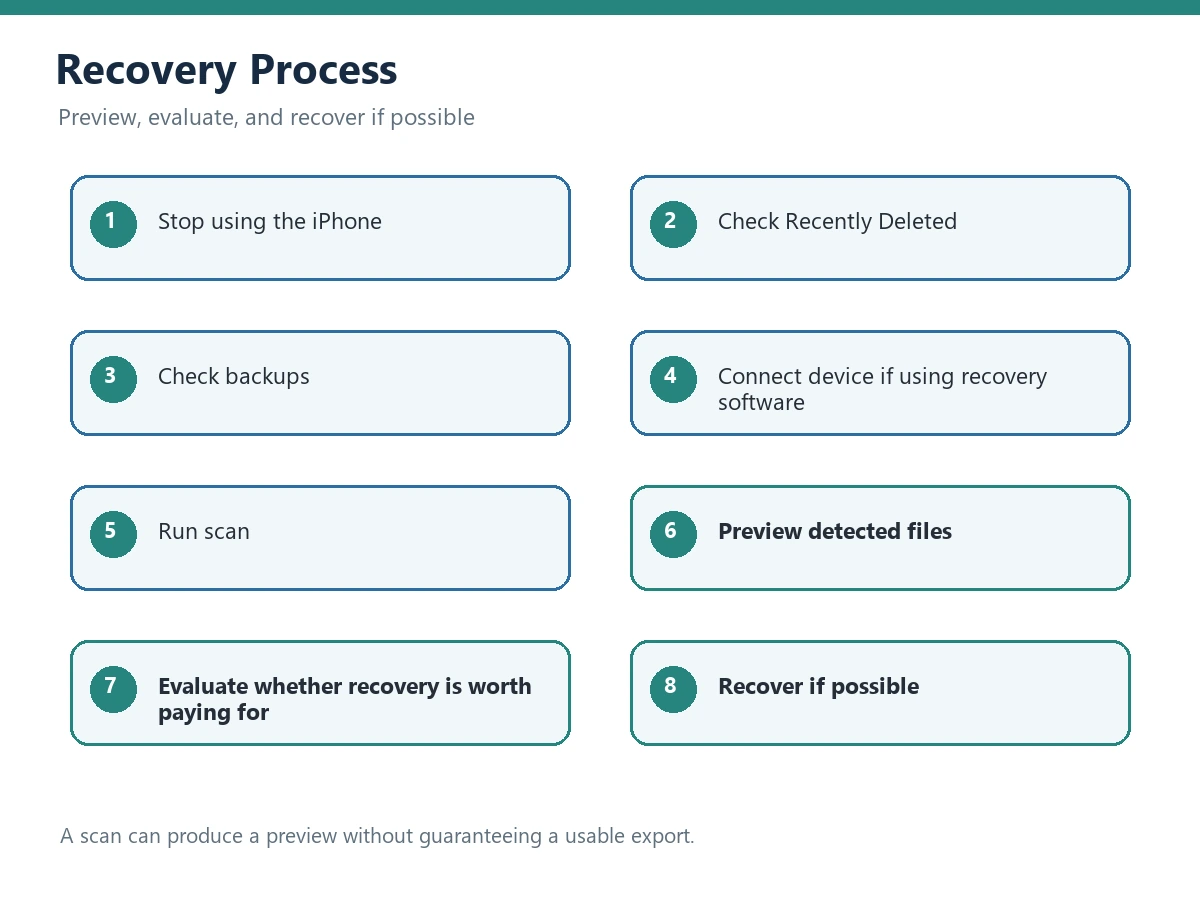
If an iPhone photo or message has just disappeared, start with the free recovery paths before installing anything. Stop taking new photos, recording video, or installing apps on the affected device. New activity can overwrite storage that a recovery process might otherwise be able to inspect. There is no universal recovery guarantee: the result depends on where the item still exists, how long ago it was deleted, whether a backup is available, and whether the storage has been reused.
Affiliate Disclosure: We may earn a commission if you purchase through links on this page. This does not increase the price you pay and does not affect how we evaluate recovery options.
Free Recovery Methods to Check First
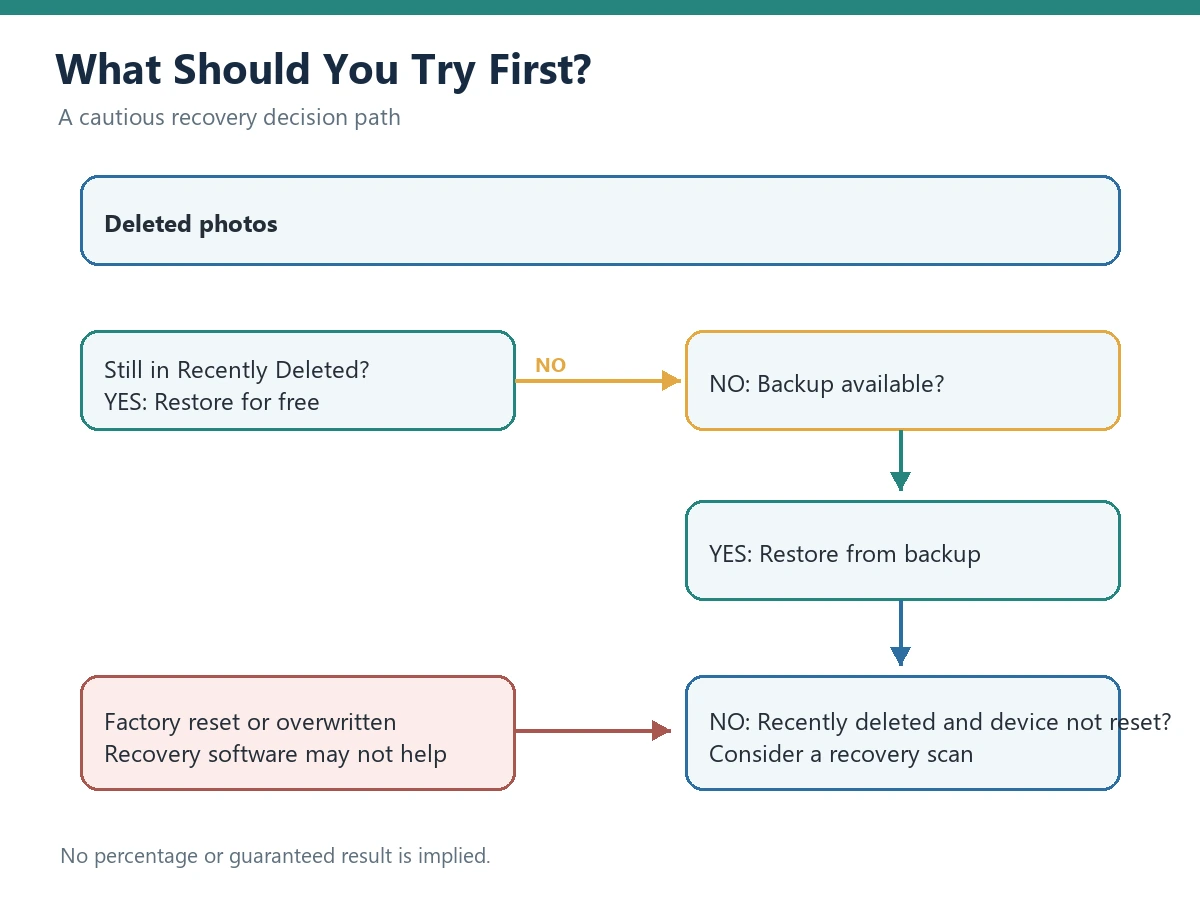
Check Apple’s built-in recovery paths and any independent copy first. They are free, reduce unnecessary installations, and may preserve the original quality. If none of them contains the item, record what you checked before considering a preview-first software workflow.
Recently Deleted in Photos
Deleted photos and videos normally remain in Recently Deleted for 30 days before permanent deletion. If the item is still there, restore it directly and save another copy somewhere safe. Menu labels can vary slightly by iOS version, but an empty Recently Deleted album does not prove that no backup or independent copy exists.
iCloud Photos
Check Recently Deleted in Photos and on iCloud.com. If iCloud Photos is enabled, deletions normally sync across devices using the same iCloud Photos library, so another synced Apple device should not be treated as an independent backup. Look instead for exported, downloaded, shared, or otherwise independent copies.
iCloud Backup
Check whether a usable iCloud Backup exists and verify its date before restoring anything. Whether a backup contains the data you need depends on the device’s iCloud settings and when the backup was created. Record the backup date and current device state before choosing a restore.
iTunes or Finder Backup
On a computer that has been used to back up the iPhone, inspect the available iTunes or Finder backups. Confirm which device and date each backup represents. Keep the original backup untouched and, where possible, work from a copy or use a preview step before replacing current phone data.
Messages, Files, Mail, and Shared Copies
For deleted messages, search other conversations, Mail, Files, shared albums, and trusted devices for an attachment or forwarded copy. The Messages app may also expose a Recently Deleted area on supported iOS versions. A copy found in another service is often safer to export than a deep scan of the phone.
Can Deleted iPhone Photos Be Recovered Without a Backup?
Sometimes, but a no-backup situation is not a promise that a recovery tool can reconstruct every deleted file. Modern phones use encryption and storage management that can make old records difficult or impossible to retrieve. A scan can find a preview without producing a usable export, and the result can vary between two devices with the same model.
Which Recovery Option Fits Your Situation?
Use the row that best matches your situation. The table gives an order of operations, not a recovery percentage or a guarantee.
| Your Situation | Try This First | Should You Use Recovery Software? |
|---|---|---|
| Recently Deleted is still available | Restore directly in Photos and save another copy. | Usually not necessary unless another copy is missing or damaged. |
| An iCloud or computer backup exists | Verify the backup date and contents before restoring or exporting. | Consider a preview workflow only if you need to inspect the backup without replacing current data. |
| No backup and the deletion was recent | Stop new activity and check independent copies, Messages, Files, shared albums, and any available cloud or computer backup. | It may be reasonable to evaluate a tool that previews results before payment; the outcome remains uncertain. |
| Factory reset with no backup | Preserve the device and document what happened. | Software recovery is unlikely; consider a qualified professional service for irreplaceable data. |
| Physical device damage | Stop powering or repeatedly connecting the device and seek a qualified service. | A normal software scan may not access damaged storage and should not be treated as a guaranteed solution. |
The table avoids invented percentages because recoverability depends on the device, timing, storage state, and available source. A result that can be previewed is not the same as a verified, full-quality export.
How We Evaluate iPhone Data Recovery Software
We evaluated this category using a transparent decision framework, not a claim of a completed device recovery test. The review is based on product documentation, recovery scenario analysis, feature and limitation comparison, pricing and preview transparency, and user decision value. Readers should verify current product pages and terms because supported systems, plans, and features can change.
- Recovery scenario coverage: Can the workflow address the reader’s source, such as the device, an iCloud backup, or an iTunes/Finder backup?
- Preview before payment: Can a user inspect representative results before paying or exporting a large batch?
- Supported recovery methods: Are the current device, backup source, file types, and operating system listed as supported?
- User experience: Are the steps understandable, reversible where possible, and clear about what the scan is doing?
- Pricing transparency: Are trial, export, subscription, one-time, renewal, and refund terms visible at the time of purchase?
- Recovery limitations: Does the documentation explain factory resets, overwritten data, encryption, and physical damage instead of promising a universal result?
When Is Recovery Software Unlikely to Work?
Recovery software is unlikely to help when the usable records have been overwritten, a factory reset removed the accessible path, or physical storage damage prevents the device from being read. No recovery software can guarantee recovery in every situation. Preserve the device and any backup, avoid repeated scans or installations, and consider a qualified professional service when the data is irreplaceable.
- Factory reset situations: Treat recovery as unlikely when there is no separate backup or synchronized copy.
- Overwritten data: New photos, videos, apps, and updates can reuse storage that once held deleted records.
- Physical storage damage: A normal desktop scan may not access a device with damaged storage or a failed connection.
When Can iPhone Recovery Software Help?
It can be worth evaluating when free methods do not locate the item, a compatible backup needs a searchable preview, or you need one workflow for supported photos, messages, and related file types. The useful feature is the ability to inspect what can still be found before deciding what to export, not a promise of success.
EaseUS MobiSaver is a desktop recovery utility that we reviewed against these criteria. According to product documentation, it can be evaluated for device, iTunes/Finder, or iCloud-related recovery paths when the current release lists those sources as supported. Compatibility, scan modes, export limits, and licensing can change, so confirm the current system requirements and plan terms on the official product page before downloading or paying.
See EaseUS MobiSaver Recovery Options
Is EaseUS MobiSaver Worth Trying?
It may be worth trying when the free methods and known backups do not solve the problem, the current release supports your device and source, and you can preview representative results before deciding. It may not be worth buying when the item is still in Recently Deleted, a backup has not been checked, or the device has suffered physical storage damage.
What it may help with
- Searching supported iPhone data sources from a computer instead of manually opening many folders.
- Filtering recoverable or previewable photos, messages, and related file types when the current version supports them.
- Comparing a preview with a remaining copy before exporting, which can reduce accidental overwrites.
- Giving a user a repeatable checklist for a device, iTunes/Finder backup, or iCloud-related path.
Limits to keep in view
- It cannot guarantee recovery after a factory reset, secure erasure, physical failure, or storage overwrite.
- A free scan or preview may not include unrestricted export; check the current terms instead of assuming “free” means full recovery.
- Supported iOS versions, macOS/Windows requirements, device access, and license limits must be confirmed for the current release.
- A preview can be incomplete, corrupted, or lower quality than the original. Verify representative files before purchase.
Who it may suit
It may suit someone who has already checked Recently Deleted and backups, can connect the device or an accessible backup to a computer, and wants a guided preview before deciding whether the cost is justified.
Who should not buy yet
Do not buy in a rush if the item is still in Recently Deleted, a known backup has not been checked, the phone is still being actively used, or the product cannot confirm support for your device and operating system. A professional service may be more appropriate for physical damage, legal evidence, or irreplaceable data.
EaseUS MobiSaver Alternatives
The best alternative may be a free Apple method. If a backup contains the item, restoring or exporting from that backup avoids an unnecessary scan. If you need software, compare tools by supported iOS versions, backup sources, preview quality, export restrictions, license type, refund terms, and whether the workflow requires installing anything on the affected phone.
Do not compare products using invented recovery percentages or a competitor name that you have not independently verified. A one-time license may be preferable for a single incident, while a subscription may make sense only if its ongoing value and cancellation terms are clear. Keep your decision tied to the exact data source and failure scenario.
FAQ
Can I recover deleted photos from iPhone without backup?
You may be able to recover them from Recently Deleted, an independent exported, downloaded, or shared copy, or another available backup. If the phone was reset or the data was overwritten, recovery may be impossible. No software can guarantee a result in that situation.
How can I recover deleted messages from iPhone without backup?
Check the Messages Recently Deleted area when available, search other Apple devices and attachments, and review iCloud or computer backups. Minimize new activity before considering software. Confirm that an exported message is complete and readable before treating it as recovered.
Is EaseUS MobiSaver free?
The current release may allow some scanning or previewing without payment, while export or broader features may require a paid plan. Verify the official pricing and trial limitations at the time you use it; do not treat an old review as a permanent price or feature promise.
Final Thoughts
Start with Recently Deleted, iCloud, iTunes/Finder, and other copies before buying anything. If those routes fail, choose recovery software only after checking compatibility, preview behavior, license terms, and refund conditions. EaseUS MobiSaver can be a reasonable option to evaluate when its documented sources match your situation, but it is not a substitute for backups and cannot undo every form of data loss.
Free methods didn’t work? See whether EaseUS MobiSaver fits your recovery situation.
Disclosure: This article contains an affiliate link. We may receive a commission if you purchase through it, at no additional cost to you.
Editorial Information
Reviewed by: dbmime Editorial
Last updated: August 8, 2026